Posts

EFL – learner management system

The Educators EFL - Learner management system gives every EFL teacher the ability to manage all their students (classroom based, private tuition, video conferencing), irrespective of their level of English in one virtual room. The room is equipped with both interim/progress quizzes and exam for determining the learner’s overall English Language level.

The key features:

  1. Managing your students progress.
  2. Use the discussion forum as a teaching tool, encouraging peer to peer activities.
  3. Communicate with your students via email, calendar, chat room , etc …
  4. Grouping your learners.
  5. Building your network of learners.
  6. Build content for your course (Next step)
  7. Develop your own business

The Educators uses Moodle Virtual Learning Management system. If you are familiar with Moodle , you can go ahead and apply for EFL-Room . If you are not familiar with Moodle, we have developed a special training course for you, it is quick and efficient. Managing EFL Students online course is delivered in two stages, stage one is an online course about using Moodle key features required for this programme, and stage two is about giving a hands on experience. You will be given a teaching role in a room (similar to EFL Room) with a small group of your students.

Next Step:

For those who want to go further and develop their own online course, The Educators is your keen partner. We have all the training you need to convert your course to a vibrant teaching environment. (Click here for prices)

Contact us for our special offers

The Educators runs number of international development projects, which include free training and virtual room. Just fill the form below for further information.

Register your interest

[Form id=”16″]

The Educators Road Map For The Next Generation of Work

This road map for the next generation of work is for the up and coming generation to make sure they start on the right foot.

What happens when the tools & technologies we use every day become mainstream parts of the business world?
What happens when we stop leading separate “consumer” & “professional” lives when it comes to technology stacks?

The result is a dramatic change in the products we use at work and as a result an upending of the canon of management practices that define how work is done.

New tools are appearing that radically alter the traditional definitions of productivity and work. Businesses failing to embrace these changes will find their employees simply working around IT at levels we have not seen even during the earliest days of the PC. Too many enterprises are either flat-out resisting these shifts or hoping for a “transition”—disruption is taking place, not only to every business, but within every business.

The Educators Work Culture

Continuous productivity is an era that fosters a seamless integration between consumer and business platforms. Continuous productivity manifests itself as an environment where the evolving tools and culture make it possible to innovate more and faster than ever, with significantly improved execution. Together our industry is shaping a new way to learn, work, and live with the power of software and mobile computing—an era of continuous productivity.

Continuous productivity is possible

Continuous productivity shifts our efforts from the start/stop world of episodic work and work products to one that builds on the technologies that start to answer what happens when:

  • A generation of new employees has access to the collective knowledge of an entire profession, experts, or enterprise.
  • Collaboration takes place across organisation and company boundaries with everyone connected by a social fibre rather than the organisations hierarchy.
  • Data, knowledge, analysis, and opinion are equally available to every member of a team in formats that are digital, sharable, and structured.
  • People have the ability to time slice, context switch, and proactively deal with situations as they arise, shifting from a start/stop environment to one that is continuous.

Join The Educators Pioneering projects

The vast majority of organisations are struggling right now with how to face these challenges. Beside the ones who try to ignore this shift, majority of the organisations are trying to use this new technology to run their old system. You are welcome to join The Eductors as an individual and develop your teaching environment or join any of our current and futur group projects.

How Different is the way we work:

The availability of the information and communications tools has allowed us to move from a hierarchical access model of the past to a much more collaborative and sharing-first approach. Every member have access to the raw “feeds” that could be material to their role. Teams become the focus of collaborative work, empowered by the data to inform their decisions. The increasing use of “crowds” and product usage telemetry able to guide improved our services, based not on sampling and forecasting but on what amounts to a census of real-world usage.

The following table contrasts the way we work (continuous productivity) and the current norms.

Traditional way
Continuous Productivity
Process Exploration
Hierarchy, top down or middle out Network, bottom up
Internal committees Internal and external teams, crowds
Strategy-centric Execution-centric
Presenting packaged and produced ideas, documents Sharing ideas and perspectives continuously, service
Data based on snapshots at intervals, viewed statically Data always real-time, viewed dynamically
Process-centric Rhythm-centric
Exact answers Approximation and iteration
More users More usage

The cultural changes encouraged and enabled by continuous productivity include:

  • Innovate more and faster. The bottom line is that by compressing the time between meaningful interactions between members of a team, we will go from problem to solution faster. Whether solving a problem with an existing product or service or thinking up a new one, the continuous nature of communication speeds up the velocity and quality of work.
  • Flatten hierarchy. Equal access to tools and information, a continuous multi-way dialog, and the ease and bringing together relevant parties regardless of place in the organisation flattens the hierarchy, this is the key.
  • Improve execution. Execution improves because members of teams have access to the interactions and data in real-time. Gone are the days of “game of telephone” where information needed to “cascade” through an organization only to be reinterpreted or even filtered by each level of an organization.
  • Respond to changes using telemetry / data. With the advent of continuous real-world usage telemetry, the debate and dialog move from the problems to the solution. You don’t spend energy arguing over the problem, but debating the merits of various solutions.
  • Strengthen organization and partnerships. Organisations that communicate openly and transparently leave much less room for politics and hidden agendas. The transparency afforded by tools might introduce some rough and tumble in the early days as new “norms” are created but over time the ability to collaborate will only improve given the shared context and information base everyone works from.
  • Focus on the destination, not the journey. The real-time sharing of information forces organizations to operate in real-time. Problems are in the here and now and demand solutions in the present. The benefit of this “pressure” is that a focus on the internal systems, the steps along the way, or intermediate results is, out of necessity, de-emphasised.

Follow the following article for further reading.


  1. Road Map For The Next Generation of Work – Paradigm shift (1)
  2. Road Map For The Next Generation of Work – Theory & Technology (2)
  3. Road Map For The Next Generation of Work – Examples and Checklist (3)


Effective Visuals

Along with having great course content, you should also have an outstanding use of effective visuals throughout the entire course.

Sometimes finding the right images can be more difficult than originally anticipated. Your images must add value to the course, whether it is a graph or chart explaining the information, or just an example photo that the student can relate to.

Keep in mind that specific eLearning platforms can have different ways to feature visuals throughout your course. These are 10 Do’s and Don’ts for choosing eLearning visuals, beginning with the quality.Do find quality images. Avoid using blurry or pixelated images within your courses. Rather than looking unprofessional or distracting your students, either use quality images or none at all.

Don’t use visuals without a purpose. It is important that all of your images have a purpose and add value to your course. Don’t use images just for decoration or to fill in space. Images without a specific meaning may be distracting to your students, rather than helpful.

Do choose valuable images. Your images must add value to the course, whether it is a graph or chart explaining the information, or just an example photo that the student can relate to. Be sure the images resonate with your students.

Don’t use overly complex visuals. If you have a complex graphic that is crucial to your course, consider placing it on it’s own slide with the description separately. This will allow for a larger image and the students are likely to see more (or all) of the details. When possible, avoid complex graphics and go for a simpler version, while still getting the point across.

Do use a variety of visuals. Be sure your course has a variety of graphics and images throughout. These include charts, handouts, photos, or even bullet points or lists. Different medias and visuals help the student organize their information better.

Don’t overload your courses with images. Adding too many visual elements can quickly become cluttered and overwhelming for the student. With less visuals, the student can better focus on the content.

Do use words and pictures together. Consider placing text and images together, expressing the same message in two different ways. Students can likely learn faster and remember key terms when associated to an image.

Don’t add text to busy images. Placing text with an already complicated graphic will only further the complexity. Place the text on a different screen in this case.

Do use a consistent image style. Consistency helps students focus on the material rather than worrying about the design changing throughout the course.

Don’t copy images from Google. Many images seen via Google are copyrighted and therefore, you will be violating copyright if you use them in your course.

With these 10 visual Do’s and Don’ts, you can create your online course in no time via an eLearning platform. Be sure to utilize your eLearning platform to add visuals throughout the entire course, not just in the presentations.

Are you looking for quality images to use in your online learning courses? These are 10 free stock photo resources and 10 free eLearning graphics tools.

Harness the New Tools for Training

Transform Training

Over the next five years, how you train and educate your staff won’t just change; it’ll transform.

What’s the difference?

  • Changing means continuing to do essentially the same thing, only introducing some variation in degree.
  • Transformation means doing something utterly and radically different.

For example, moving our music from cassette tape to CD changed how you listen to music. But going from a CD to having all your music in digital format on your smart phone and with you at all times transformed how you listen to music.

Exponential changes driven by processing power, storage, and bandwidth are now reaching a stage that allows us to transform business processes including how we educate and train our workforce. This transformation will certainly accelerate. The only question is whether your organization will take advantage of it.

So what does the future of corporate training look like? To get a clear picture, you first have to know a few facts:

  • The majority of phones professionals are using worldwide are smart phones. In other words, your employees’ phones are actually multimedia computers with internet access. That alone has huge ramifications for training them.
  • Tablets and smartphones are outselling PCs globally and employees have access to them wherever they go including home. So smart mobile devices like phones and tablets are rapidly becoming the new platforms for training and education. That doesn’t mean employees are no longer using laptops, it means we are using them in different ways and much less.
  • These smart devices will get exponentially smarter every year, giving us new capabilities. It used to be to access a super computer you had to be a university or major corporation. Today, even a small company can access (from their phone) a super computer in the cloud and run advanced simulations.

Knowing these things, it’s time to rethink how to train your employees from here on out.

Here’s how to do it

New Tools for Training:

  • Implement Just-in-Time Training
    For most people, the best way to learn something is by doing it. That’s what just-in-time training enables people to do. Rather than sit in a classroom or one-on-one with someone and learn, people can learn in real-time. Remember, most employees have a multimedia computer with them at all times (their phone or tablet). With just-in-time training, they can access any element of what they need to know at the moment of need. If they have a question or need assistance, they simply touch an icon on their device’s screen and are connected to a live trainer who can help. If the trainer needs to see something to give assistance, the employee can aim the device’s built-in camera to the problem so the trainer can see it. This alone would cut training costs tremendously.Does this mean we eliminate classroom or other formal training sessions? No. There will still be formal training, but less of it because now we can have distributed training in real-time that’s just-in-time. So this isn’t about getting rid of something; it’s about using a new tool for training and education.
  • Create Interactive Training Materials
    We also now have the ability to create interactive training manuals and textbooks. In the past, e-books have been static, basically an electronic PDF of the book. Now they are becoming dynamic e-books where you have embedded audio, video, and links to other resources. And thanks to visual communications, you can even have a way for employees to tap a special button in the training manual and be connected to someone who can give more advanced training on a specific subject.Additionally, employees can tap into a series of videos that allows them to personalize the training for their specific needs. Since the training manual is no longer static, employees can personalize the manual by plugging into a menu of more advanced training options embedded within.
  • Today, training is measured in one-hour blocks of time. One hour needs to become ten-minute blocks of highly focused time.
    I recently heard some one say they watched “an entire TED talk” as if it was a long amount of time. Our attention spans are short and the list of things each of us must accomplish seems to be getting longer. Measuring the units of training in one-hour blocks of time is already obsolete.By taking advantage of the virtual, mobile, social, and visual revolutions that are already taking place, we should measure employees training units in ten-minute blocks that include a short focused lesson with an application tool.
  • Tap Into the Gameification of Training and Education
    Gaming isn’t just for kids. Interactive gaming is a tool that can transform training and education. I’ve identified five core elements of gameification that when applied together can dramatically accelerate learning. They are:
  1. Self-diagnostic. Interactive, competitive, and immersed training modules can know each person’s skill or knowledge level and progress accordingly. It can know where someone left off and give next steps from that point when the person logs back in. This is the best way to allow for individual training and learning.
  2. Interactivity. Regardless of someone’s inherent learning style, learning is much more effective when you’re interacting with the material, not passively sitting there. When you learn by gaming, you’re interacting with the information and concepts and actually doing things. It’s no longer passive training.
  3. Immersion. In the recent past to the present, video games use interspatial 3D, where you go into worlds. So instead of images popping out at you, you go inside to them. That’s how games on the Xbox 360 and others have been working for years, by using a regular television set or flat panel display. This sort of technology gives an immersed effect, which engages people more.
  4. Competition. Humans are naturally competitive beings. When you’re sitting in class or doing one-on-one learning, there’s little competitive value. No one advances until the session is over. However, when you’re competing, as in a game, there’s an adrenaline rush that keeps you engaged and focused on the task at hand. In an effort to “win,” people master concepts faster.
  5. Focus. When you’re playing a game, you’re forced to focus. You have to do A in order for B to occur. If you don’t do A, then you won’t get far in the game. Focus is the result of interactivity, competition, immersion, and self-diagnosis. When you can focus, you can learn virtually anything…fast.

Embrace the New Era of Training

The ideas mentioned here are already possible. Use them to redefine how your company trains its employees. Since businesses spend large sums of money on training and education, anything that can accelerate or enhance learning will save both time and money.

And always remember, if it can be done it will be done; if you don’t do it someone else will.

Based on article by:


The Basics of Teaching Online

Teaching online can be very different from teaching in a traditional classroom. An instructor who accepts employment teaching online must be prepared to help students learn without face-to-face interaction and live discussion. Teaching online certainly isn’t for everyone. However, many instructors enjoy the freedom of virtual instruction and the opportunity to interact with students from around the nation. Is teaching online right for you? Explore the pros and cons of e-instruction, the requirements necessary for teaching online, and the ways you can find an online teaching job.

How to Qualify for Positions Teaching Online

In order to qualify for a position teaching online, applicants must generally meet the same requirements as traditional teachers. At the high school level, online teachers must have a bachelor’s degree and a teaching license. At the community college level, a master’s degree is the minimum requirement for teaching online. At the university level, a doctorate is generally required. In some cases, colleges accept adjunct online professors without requiring them to meet the same standards as traditional, tenure-track teachers. Working professionals may also be able to get a position teaching online in relation to their chosen field. At every level of teaching online, schools seek candidates who are familiar with the internet and content management systems such as Blackboard. Prior experience with teaching online and instructional design is highly desirable.

Pros of Teaching Online

There are many advantages to teaching online. Virtual instructors are often able to work from anywhere they choose. You could get a job teaching online for a prestigious school in another state and not have to worry about relocating. Since many e-courses are taught asynchronously, instructors are often able to set their own hours while teaching online. Additionally, instructors who make a living teaching online are able to interact with pupils from around the nation.

Cons of Teaching Online

Teaching online also comes with some notable drawbacks. Sometimes a pre-made curriculum is forced upon instructors teaching online, denying them the ability to use materials that have proved successful in their past courses. Teaching online can be isolating, and many instructors prefer interacting face-to-face with their pupils and peers. Some schools do not value online adjunct teachers, which can result in less pay and less respect in the academic community.

Find Jobs Teaching Online

Some colleges fill online teaching positions by selecting from the current faculty pool. Others post job descriptions specifically for instructors interested in teaching online. Below are some of the best places to find jobs teaching online. When looking for positions on websites without a distance learning focus, simply type “online instructor,” “online teacher,” “online adjunct,” or “distance learning,” into the search box. Jobs Teaching Online – General Focus

Jobs Teaching Online – Distance Learning Specific

More Links

  • Online Teachers Posing as Students
  • Earning an Online Education Degree

Related Articles

  • Online Course Instructor Job Profile
  • Online Faculty - Teaching at Online Colleges - Online Adjunct Faculty and I…
  • Where to Sell Your Online Class
  • Online Teacher: Career Profile
  • Online Tutor Jobs - Home Based Tutor Jobs Online - Teaching

Article by: Jamie Littlefield About.com Distance Learning

Key skills e-learning project manager must have

One of the most important ingredients for the success of your e-learning project is the team that you will be working with. Most Project Managers are not in the fortunate position that they can choose their teams.

It is highly likely that you will also have to manage people as part of the project for whom this is not their day job. This blog looks at some of the skills you will require as a Project Manager and some of the ways you can manage and motivate your team to achieve success.

The Project Manager

Congratulations if you have taken on the role of Project Manager for an e-learning project. It will be an exciting and rewarding project that can make a real difference to your organisation and your customers. Here are some of the key attributes you will need.
1. Conciliator
You may encounter conflict – either personally – or between your project team members and you will need to find a way to resolve the conflict and move on.
2. Communicator
Key to your role will be keeping everyone informed of the project and its progress. You need to be able to sell new ideas to people and get commitment to your project.
3. Manager
You will be managing people working for you on the project – either directly or in a matrix structure.
4. Administrator
You may have to be responsible for keeping a selection of project documents up to date.
5. Negotiator
You will need to negotiate for resources and compete with other projects to get senior management commitment.
6. Politician
Your project is a key change in the organisation and you will need to be skilled at managing different points of view and reactions.
7. Influencer
You will need to “sell” the change to people across the organisation and take actions that will persuade people to adapt to a new way of doing things.
8. Planner and organiser
You will be managing a range of activities that need to take place within specified timescales.
9. Technician
You will need to understand the systems and processes of the organisation you work in and to have knowledge of the techniques used in project management and planning (see previous section).
10. Business professional
Delivering a project requires strong business acumen particularly if you are responsible for a budget and resources.
11. Change agent
Delivering a project means change and you will need to be comfortable with change management processes and techniques.

So not much required for the job of Project Manager!
As well as these it is helpful for the project manager to understand the systems and processes of the organisation they work in and to have a knowledge of the techniques used in project management and planning.

The role of Project Manager – filling the gaps

It is not always possible to have all of the skills and knowledge required in one person. We all work differently and over time have developed strengths in different areas. We also have a personal preference for the way we work. If there are areas in which you don’t feel confident you can…
1. Formal Training and Development
Depending on the project timescale you may have the opportunity to invest in your own development and learn new skills. Learning Pool can provide a range of training options to assist you with e-learning skills and knowledge. Other formal training could include Project Management, Leadership and Team Building. Check the Learning Pool catalogue for what you can learn from our courses.
2. On the Job Learning
Having completed some e-learning you may feel comfortable about applying your new skills and knowledge whilst you are working on the project. For example, completing the project documentation is something that you can really only get good at when you do it. Work with your team, be honest about your level of experience and learn together.
3. Coaching and Mentoring
You may identify someone in your organisation who is a good project manager that you would benefit from their skills and experience. Ask them to help you. It is always very satisfying to be asked. You may wish to shadow their meetings or talk them through the issues you are trying to resolve. Your Learning Pool team are also on hand to help you.
4. Delegation
I’m useless with numbers. I know that and no matter how hard I’ve tried to learn I don’t seem to get it. Recognising this I have always made friends with the people in Finance and ensure that I have one of them on my team. If there are areas that you don’t have the skills or experience in, find someone who does.
Three rewards of being a good Project Manager

So why do this?

It might be that you are passionate about your project and want to see it delivered successfully. That must be the ultimate satisfaction for any project manager. But you can also achieve the following:

  1. Developing Yourself - New skills, new challenges, new people! All of these will help you to develop your experience and knowledge.
  2. Developing Others - Introducing e-learning will give you the opportunity to introduce your team to a new system, the way in which you deliver your project may also give people the chance to develop themselves. Include personal development plans as part of your project.
  3. Developing the Organisation - As well as delivering a product that is all about development, you have the chance to deliver your project in such a way that the organisation benefits from the learning you experience. Your Project Closure Report should identify any new ways of doing things that worked well and can be passed on to others.

Article by: Wendy Kay

online-teaching

Course Designers Package

In 2013 we introduced a free comprehensive guide on how to take your course online to help both the digitisation and structuring of knowledge for our readers. The Educators’ initiative for 2014 is to promote the preservation of knowledge (in diverse digital formats) and structuring of the knowledge as a teaching tool. In 2014 we are extending our existing service with more direct collaboration with this extensive package:

Training programmes (Course Designers Package):

  • Teachers Starter Pack
  • Moodle Course Design Pack
  • Help with Curriculum Design
  • Course Validation & Certification
  • Help with Internet Marking
  • Virtual Class Room

Our workshops and online programs are built round the simple principles of providing high quality, practical and pragmatic solutions that enable you to deliver a significant improvements in terms of quality, efficiency and performance to your current activity. 

If you have an in-depth knowledge and understanding on your specialised subject and are ready to learn new technology, then we are interested to hear from you.

A passion to help others together with exemplary facilitation and presentation skills is essential. We will be your partner and provide both technical and marketing help.

Make a request now it takes less than a minute!

[Form id=”16″]

Whats on offer?

Thank you for your interest.

While we are dealing with your enquiry, you can start with our Free Guide on how to take your course online.

Just click on the text to read more.

e-learning technology content and services:

Have a look at our training programmes

Join our team as:

  • Certified member - Take any of the online courses and become certified member. (Subject to passing the exam)
  • Developer member - Collaborative Course Designers Package (Subject to Approval)
  • Teaching member - Join our approved teaching community (Subject to Approval)

JOIN THE EDUCATORS

And CHANGE your life!

Empower Yourself

You can, and should, empower yourself.

We tend to think of empowerment as a gift granted to us by others. Your supervisor empowers you to make decisions; your government empowers you to vote; a business empowers you to customize a product. These are all examples of empowerment, to be sure, but they are not the only ways we can experience it.

Empowering yourself means deciding your own path and doing what you need to do to acquire the skills and opportunities necessary to follow that path.

Steps to Self-Empowerment

Step 1: Expand Your Mind. Before you act in an empowered manner, you must be able to think in an empowered manner. Often, this means learning to let your mind roam beyond the parameters of what you have learned in school or been trained to do on the job.

Opening your mind to the possibilities is a skill that must be constantly practiced. Study, read, engage with others who can teach you something new.

Step 2: Expand Your Territory. If you are in extend your field of studies, start teaching part times, study abroad. If you are in the workplace, seek opportunities to travel, take assignments in another city or country, expand your expertise, get involved with new technology. Your exposure to new visions of success will radically change your thinking.

Next Step - The Educators Starter Pack

The starter pack is designed to empower you to manage your students community from different sources in one place. In most cases The Educators provide related test and content online to assist your teaching. The starter pack is offered free of charge (subject to approval) and is made of two stages:

Stage 1- You are given an online training/inductions programme. This online programme is designed to give you an understanding or how a virtual room works. Here you will be using the system as a student, this gives us the opportunity to not only to train you but also you will gain the learner experience which is crucial for the next stage.

Stage 2- On a successful completion of the first stage you will be given a class room to manage (content in the class is subject to your expertise). You will be expected to enrol few students (5 min. to 10 max.) on your course and manage them through their tasks. Next step is to run your class subject to contract. (Click here for Standard Service Rates)

TheEducators.com aims to create a wider spectrum of possibilities for its members. We create the opportunities, and you empower yourself.

You can carry on with further training programmes (Instructional Design, Moodle Course Design, Teaching with Moodle, Test and Assessment Design, Moodle Administrator, VLE Architecture)

What is the Tin Can API?

The Tin Can API

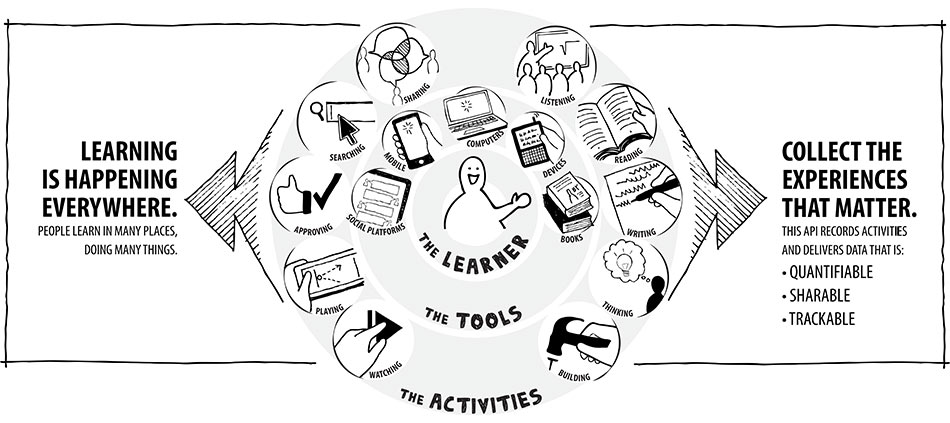
The Tin Can API (sometimes known as the Experience API or xAPI) is a brand new specification for learning technology that makes it possible to collect data about the wide range of experiences a person has (online and offline). This API captures data in a consistent format about a person or group’s activities from many technologies. Very different systems are able to securely communicate by capturing and sharing this stream of activities using Tin Can’s simple vocabulary.

Previous specifications were difficult and had limitations (see Tin Can vs SCORM), but the Tin Can API is simple and flexible. It lifts many of the older restrictions. Mobile learning, simulations, virtual worlds, serious games, real-world activities, experiential learning, social learning, offline learning, and collaborative learning are just some of the things that can now be recognized and communicated well with the Tin Can API.

It’s important to know that we don’t own the Tin Can API. ADL is the steward of the specification. We just know this space so well that ADL asked us to help develop it. The Tin Can API is community-driven, and free to implement.

How does the Tin Can API work?

  • People learn from interactions with other people, content, and beyond. These actions can happen anywhere and signal an event where learning could occur. All of these can be recorded with the Tin Can API.
  • When an activity needs to be recorded, the application sends secure statements in the form of “Noun, verb, object” or “I did this” to a Learning Record Store (LRS.)
  • Learning Record Stores record all of the statements made. An LRS can share these statements with other LRSs. An LRS can exist on its own, or inside an LMS.

The freedoms of the Tin Can API

  • Statement freedom: the structure of “statements” using nouns, verbs and objects lets you record almost any activity. Think: “I did this.”
  • History freedom: the Tin Can API allows LRSs to talk to each other. LRSs can share data and transcripts with one another, and your experiences can follow you from one LRS (or organization) to another. Learners can even have their own “personal data lockers” with their personal learning information inside them.

  • Device freedom: any enabled device can send Tin Can API statements (mobile phones, simulations, games, a CPR dummy, the list goes on). A constant network connection isn’t necessary — occasional connectivity is fine.
  • Workflow freedom: tracking learning events doesn’t have to start or end in an LMS, it can start wherever the learner is and on whatever device they choose to use. Your content isn’t tied to an LMS.

I want to dive deeper

If you want to realize the full implications of the Tin Can API, check out “The Layers of the Tin Can Onion” by Mike Rustici. You can also download the full Tin Can API specification here.

Tin Can API for Moodle users

  1. Launch externally Tin Can API activities from
  2. Launch externally Tin Can API activities from Moodle and track on any LRS. Compatible with Storyline, Captivate and others! Maintained by: Picture of Andrew Downes Andrew Downes
  3. Implement Experience API (Tin Can) - Moodle Experience API (formally called Tin Can) is the new version of SCORM - the commercial Rustici SCORM plugin for Moodle supports Tin Can

The Tin Can API and Rustici Software

ADL, the keepers of SCORM, issued a BAA asking for ideas for the next generation of SCORM. We applied, and they asked us to research what the next-generation e-learning specification could/should look like.

Mobile Apps Will Transform All Business Processes

Mobile Apps will transform all business processes. Over the next two years most companies will be using mobile apps (developed in house or bought off the shelf) to help them with such things as supply chain management, logistics, purchasing, maintenance, training, services, or sales support. Let’s face it, two years is a short amount of time considering there’s such a low percent of mobile apps for business functions today.

So, what does all this mean for your business?

It means that mobile apps designed by businesses for their internal use and competitive advantage will explode over the next two years. Therefore, all business leaders need to ask themselves: “Two years from now, do I want to be one of the companies that is not developing mobile apps to transform business processes?” Once you see the hard trends driving this software revolution, it would be hard to answer “no.”

Remember, a hard trend will happen; a soft trend might happen. The hard trend is that businesses will be developing mobile apps customized for their company for various functions. The soft trend is whether your company will be one of them.

Here’s something else to consider: The number of smart phones and tablets in all sizes of companies has obviously exploded in the last couple of years, and this hard trend is picking up speed. At the same time, the cost of being able to deploy business intelligence in every function is dropping off a cliff just as the capability of our smart devices, of our wireless and wired networks, and of both private and public clouds grows.

So with costs decreasing and capabilities increasing, the time to act is now. The question is, “How?”

The key is to assess whether you have the in-house capabilities to develop mobile apps. Some companies do, and some companies don’t. It depends on the size of the business and your IT department. However, a lot of young people do have the capabilities needed. Therefore, I would suggest that you hire or “rent a kid.” In other words, if you don’t already employ some talented young people who have both the interest and knowledge to develop mobile apps, it’s time to bring some in. They have a lot of present and future value to offer, but they do not know your needs and business requirements.

So you need to have the core competency of developing your own mobile apps for business processes that can give businesses a competitive advantage. The companies that transform their business processes using mobility will achieve new levels of success. The time for business process transformation is now.

Article by:Daniel Burrus Daniel Burrus is considered one of the World’s Leading Futurists on Global Trends and Innovation, a top LinkedIn Global INfluencer, and is the founder and CEO of Burrus Research

IT Trends Effecting Online Training

Here is the list of IT trends effecting online training and education. Most of you involved in elearning have embraced the first six points of this article. I suggest you pay more attention to the items 7 to 12. The following is the summary of the article by DANIEL BURRUS.

No matter what industry you’re in, your company can’t survive without technology. From smart phones and tablets to mobile apps and cloud-based technology, there’s a plethora of technological advancements to not only keep track of, but also to profit from.

To stay competitive, every organisation needs to anticipate the most significant technology trends that are shaping their business and changing their customer, and then develop innovative ways to use them to their advantage, both inside and outside of their organisation. Remember, if it can be done, it will be done. If you don’t use these technologies to create a competitive advantage, someone else will.

Over the next five short years the following game-changing technologies will transform how we sell, market, communicate, collaborate, educate, train, innovate, and much more.

1. Big Data Gets Bigger and Becomes a Service.

Big Data is a term to describe the technologies and techniques used to capture and utilize the exponentially increasing streams of datawith the goal ofbringing enterprise-wide visibility and insights to make rapid critical decisions. Companies are learning the hard way that Big Bad Data can get you into trouble fast, so there is a new push to focus on the quality of the data as it is being captured.

  • High Speed Analytics using advanced cloud services will increasingly be used as a complement to existing information management systems and programs to tame the massive data explosion. This new level of data integration and analytics will require many new skills and cross-functional buy-in in order to break down the many data and organizational silos that still exist. The rapid increase in data makes this a fast-growing hard trend that cannot be ignored.
  • Big Data as-a-Service (BDaaS) will emerge this year as cloud providers offer midsize and smaller organizations access to much larger streams of relevant data they could not tap into otherwise.

2. Cloud Computing Gets Personal and Advanced Cloud Services will be increasingly embraced by business of all sizes, as this represents a major shift in how organizations obtain and maintain software, hardware, and computing capacity. As consumers, we first experienced public clouds (think about when you use Google Docs or Apple’s iCloud). Then we saw more private clouds giving companies the security and limited access they needed, as well as hybrid clouds that provided both, giving customers and consumers access to specific areas of a company’s cloud. Companies of all sizes are using the cloud to cut costs in IT, human resources, and sales management functions. As individuals increasingly use personal mobile clouds, we will see a shift to services and less of a focus on the devices we use to access our services. This shift will also help us address the three limiting factors of mobility: battery life, memory, and processors.

3. On Demand Services will increasingly be offered to companies needing to rapidly deploy new services. Hardware-as-a-Service (HaaS) is increasingly joining Software-as-a-Service (SaaS), creating what some have called “IT as a service.” The rapid growth of Collaboration-as-a-Service (CaaS), Security-as-a-Service (SaaS), Networking as-a-Service (NaaS), and many more are all giving birth to Everything as-a-Service (XaaS). As a result, IT departments in all industries will be increasingly freed to focus on enabling business process transformation, which will allow organizations to maximize their return on their technology investments.

4. Virtualisation of Storage, Desktops, Applications, and Networking will see continued acceptance and growth by both large and small businesses as virtualisation security improves. In addition to storage, we will continue to see the virtualisation of processing power, allowing mobile devices to access supercomputer capabilities and apply it to processes such as purchasing and logistics, to name a few.

5. Consumerisation of IT increases, as consumers become the driving source for innovation and technology, which is fueled by rapid advances in processing power, storage, and bandwidth. Smart companies have recognized that this is a hard trend that will continue and have stopped fighting consumerization. Instead, they are turning it into a competitive advantage by consumerizing their applications, such as recommending safe and secure third party hardware and apps. Encouraging employees to share productivity enhancing consumer technology will become a wise strategy.

6. Wear Your Own Device (WYOD) will take off this year as wearable technology goes mainstream with big players launching smart watches, smart glasses, and more, creating new problems as well as opportunities for organizations of all sizes. Over the past few years, Bring Your Own Device (BYOD) caught many IT departments by surprise; it’s now time to get in front of this this predictable hard trend and turn it into an advantage.

Are you ready to take your course online follow our free step by step advise on this site, and for those interested to design their course on Moodle platform we offer a free online course.

7. Gameification of Training and Education will acceleratea fast-moving hard trend ofusing advanced simulations and skill-based learning systems that are self-diagnostic, interactive, game-like, and competitive, all focused on giving the user an immersive experience thanks to a photo-realistic 3D interface. Some will develop software using these gaming techniques to work on existing hardware systems such as both old and new versions of Xbox and PlayStation. A social component that includes sharing will drive success.

8. Online Learning and Massive Open Online Courses (MOOC) have been embraced by highly recognized and traditional educational institutions, putting them in a position to challenge all educational systems by making Location and Tuition far less of a barrier to receiving the information, training, and knowledge people need to know in order to succeed in a rapidly changing world. This hard trend, combined with Gameification systems, will change the face of global education.

9. eBooks, eNewspapers, eMagazines and Interactive Multimedia eTextbooks are finallypassing the tipping pointdue to the abundance of smart phones and tablets that provide a full color experience, and publishers providing apps that give a better-than-paper experience by including cut, copy, paste, print, and multimedia capabilities. Interactive eTextbooks will finally take off thanks to easy-to-use software such as Apple’s iBook Author and other competing tools, freeing new publishers to create compelling and engaging content, and freeing students from a static, expensive, and literally heavy experience.

10. Social Business Applications take on a new level of urgency as organizations shift from an Information Age “informing”model to a Communication Age “communicating and engaging” model. Social Software for business will reach a new level of adoption with applications to enhance relationships, collaboration, networking, social validation, and more. Social Searchand Social Analytics will increasingly be used by marketers and researchers, not to mention Wall Street, to tap into millions of daily tweets and Facebook conversations, providing real-time analysis of many key consumer metrics.

11. Smart Phones & Tablets Get Smarter with the rapid advances in processing power, storage, and bandwidth. Smart phones have already become our primary personal computer, and the Mobile Web hasbecomea must-have capability. An Enterprise Mobility Strategy Becomes Mandatory for all size organizations as we see mobile data, mobile media, mobile sales, mobile marketing, mobile commerce, mobile finance, mobile payments, mobile health, and many more explode. The vast majority of mobile phones sold globally will have a browser, making the smart phone our primary computer that is with us 24/7 and signaling a profound shift in global computing. This new level of mobility and connectivity by many millions around the world will allow any size business to transform how they market, sell, communicate, collaborate, educate, train, and innovate using mobility.

12. Mobile Apps for Business Processes such as purchasing, supply chain, logistics, distribution, service, sales, maintenance, and more will grow rapidly. There will be an increasing focus on Business App Stores within companies giving users access to personalized information they need on their mobile devices anytime and anywhere.

Posted by: Daniel BurrusDaniel Burrus