Posts

Harness the New Tools for Training

Transform Training

Over the next five years, how you train and educate your staff won’t just change; it’ll transform.

What’s the difference?

  • Changing means continuing to do essentially the same thing, only introducing some variation in degree.
  • Transformation means doing something utterly and radically different.

For example, moving our music from cassette tape to CD changed how you listen to music. But going from a CD to having all your music in digital format on your smart phone and with you at all times transformed how you listen to music.

Exponential changes driven by processing power, storage, and bandwidth are now reaching a stage that allows us to transform business processes including how we educate and train our workforce. This transformation will certainly accelerate. The only question is whether your organization will take advantage of it.

So what does the future of corporate training look like? To get a clear picture, you first have to know a few facts:

  • The majority of phones professionals are using worldwide are smart phones. In other words, your employees’ phones are actually multimedia computers with internet access. That alone has huge ramifications for training them.
  • Tablets and smartphones are outselling PCs globally and employees have access to them wherever they go including home. So smart mobile devices like phones and tablets are rapidly becoming the new platforms for training and education. That doesn’t mean employees are no longer using laptops, it means we are using them in different ways and much less.
  • These smart devices will get exponentially smarter every year, giving us new capabilities. It used to be to access a super computer you had to be a university or major corporation. Today, even a small company can access (from their phone) a super computer in the cloud and run advanced simulations.

Knowing these things, it’s time to rethink how to train your employees from here on out.

Here’s how to do it

New Tools for Training:

  • Implement Just-in-Time Training
    For most people, the best way to learn something is by doing it. That’s what just-in-time training enables people to do. Rather than sit in a classroom or one-on-one with someone and learn, people can learn in real-time. Remember, most employees have a multimedia computer with them at all times (their phone or tablet). With just-in-time training, they can access any element of what they need to know at the moment of need. If they have a question or need assistance, they simply touch an icon on their device’s screen and are connected to a live trainer who can help. If the trainer needs to see something to give assistance, the employee can aim the device’s built-in camera to the problem so the trainer can see it. This alone would cut training costs tremendously.Does this mean we eliminate classroom or other formal training sessions? No. There will still be formal training, but less of it because now we can have distributed training in real-time that’s just-in-time. So this isn’t about getting rid of something; it’s about using a new tool for training and education.
  • Create Interactive Training Materials
    We also now have the ability to create interactive training manuals and textbooks. In the past, e-books have been static, basically an electronic PDF of the book. Now they are becoming dynamic e-books where you have embedded audio, video, and links to other resources. And thanks to visual communications, you can even have a way for employees to tap a special button in the training manual and be connected to someone who can give more advanced training on a specific subject.Additionally, employees can tap into a series of videos that allows them to personalize the training for their specific needs. Since the training manual is no longer static, employees can personalize the manual by plugging into a menu of more advanced training options embedded within.
  • Today, training is measured in one-hour blocks of time. One hour needs to become ten-minute blocks of highly focused time.
    I recently heard some one say they watched “an entire TED talk” as if it was a long amount of time. Our attention spans are short and the list of things each of us must accomplish seems to be getting longer. Measuring the units of training in one-hour blocks of time is already obsolete.By taking advantage of the virtual, mobile, social, and visual revolutions that are already taking place, we should measure employees training units in ten-minute blocks that include a short focused lesson with an application tool.
  • Tap Into the Gameification of Training and Education
    Gaming isn’t just for kids. Interactive gaming is a tool that can transform training and education. I’ve identified five core elements of gameification that when applied together can dramatically accelerate learning. They are:
  1. Self-diagnostic. Interactive, competitive, and immersed training modules can know each person’s skill or knowledge level and progress accordingly. It can know where someone left off and give next steps from that point when the person logs back in. This is the best way to allow for individual training and learning.
  2. Interactivity. Regardless of someone’s inherent learning style, learning is much more effective when you’re interacting with the material, not passively sitting there. When you learn by gaming, you’re interacting with the information and concepts and actually doing things. It’s no longer passive training.
  3. Immersion. In the recent past to the present, video games use interspatial 3D, where you go into worlds. So instead of images popping out at you, you go inside to them. That’s how games on the Xbox 360 and others have been working for years, by using a regular television set or flat panel display. This sort of technology gives an immersed effect, which engages people more.
  4. Competition. Humans are naturally competitive beings. When you’re sitting in class or doing one-on-one learning, there’s little competitive value. No one advances until the session is over. However, when you’re competing, as in a game, there’s an adrenaline rush that keeps you engaged and focused on the task at hand. In an effort to “win,” people master concepts faster.
  5. Focus. When you’re playing a game, you’re forced to focus. You have to do A in order for B to occur. If you don’t do A, then you won’t get far in the game. Focus is the result of interactivity, competition, immersion, and self-diagnosis. When you can focus, you can learn virtually anything…fast.

Embrace the New Era of Training

The ideas mentioned here are already possible. Use them to redefine how your company trains its employees. Since businesses spend large sums of money on training and education, anything that can accelerate or enhance learning will save both time and money.

And always remember, if it can be done it will be done; if you don’t do it someone else will.

Based on article by:


Key skills e-learning project manager must have

One of the most important ingredients for the success of your e-learning project is the team that you will be working with. Most Project Managers are not in the fortunate position that they can choose their teams.

It is highly likely that you will also have to manage people as part of the project for whom this is not their day job. This blog looks at some of the skills you will require as a Project Manager and some of the ways you can manage and motivate your team to achieve success.

The Project Manager

Congratulations if you have taken on the role of Project Manager for an e-learning project. It will be an exciting and rewarding project that can make a real difference to your organisation and your customers. Here are some of the key attributes you will need.
1. Conciliator
You may encounter conflict – either personally – or between your project team members and you will need to find a way to resolve the conflict and move on.
2. Communicator
Key to your role will be keeping everyone informed of the project and its progress. You need to be able to sell new ideas to people and get commitment to your project.
3. Manager
You will be managing people working for you on the project – either directly or in a matrix structure.
4. Administrator
You may have to be responsible for keeping a selection of project documents up to date.
5. Negotiator
You will need to negotiate for resources and compete with other projects to get senior management commitment.
6. Politician
Your project is a key change in the organisation and you will need to be skilled at managing different points of view and reactions.
7. Influencer
You will need to “sell” the change to people across the organisation and take actions that will persuade people to adapt to a new way of doing things.
8. Planner and organiser
You will be managing a range of activities that need to take place within specified timescales.
9. Technician
You will need to understand the systems and processes of the organisation you work in and to have knowledge of the techniques used in project management and planning (see previous section).
10. Business professional
Delivering a project requires strong business acumen particularly if you are responsible for a budget and resources.
11. Change agent
Delivering a project means change and you will need to be comfortable with change management processes and techniques.

So not much required for the job of Project Manager!
As well as these it is helpful for the project manager to understand the systems and processes of the organisation they work in and to have a knowledge of the techniques used in project management and planning.

The role of Project Manager – filling the gaps

It is not always possible to have all of the skills and knowledge required in one person. We all work differently and over time have developed strengths in different areas. We also have a personal preference for the way we work. If there are areas in which you don’t feel confident you can…
1. Formal Training and Development
Depending on the project timescale you may have the opportunity to invest in your own development and learn new skills. Learning Pool can provide a range of training options to assist you with e-learning skills and knowledge. Other formal training could include Project Management, Leadership and Team Building. Check the Learning Pool catalogue for what you can learn from our courses.
2. On the Job Learning
Having completed some e-learning you may feel comfortable about applying your new skills and knowledge whilst you are working on the project. For example, completing the project documentation is something that you can really only get good at when you do it. Work with your team, be honest about your level of experience and learn together.
3. Coaching and Mentoring
You may identify someone in your organisation who is a good project manager that you would benefit from their skills and experience. Ask them to help you. It is always very satisfying to be asked. You may wish to shadow their meetings or talk them through the issues you are trying to resolve. Your Learning Pool team are also on hand to help you.
4. Delegation
I’m useless with numbers. I know that and no matter how hard I’ve tried to learn I don’t seem to get it. Recognising this I have always made friends with the people in Finance and ensure that I have one of them on my team. If there are areas that you don’t have the skills or experience in, find someone who does.
Three rewards of being a good Project Manager

So why do this?

It might be that you are passionate about your project and want to see it delivered successfully. That must be the ultimate satisfaction for any project manager. But you can also achieve the following:

  1. Developing Yourself - New skills, new challenges, new people! All of these will help you to develop your experience and knowledge.
  2. Developing Others - Introducing e-learning will give you the opportunity to introduce your team to a new system, the way in which you deliver your project may also give people the chance to develop themselves. Include personal development plans as part of your project.
  3. Developing the Organisation - As well as delivering a product that is all about development, you have the chance to deliver your project in such a way that the organisation benefits from the learning you experience. Your Project Closure Report should identify any new ways of doing things that worked well and can be passed on to others.

Article by: Wendy Kay

online-teaching

Course Designers Package

In 2013 we introduced a free comprehensive guide on how to take your course online to help both the digitisation and structuring of knowledge for our readers. The Educators’ initiative for 2014 is to promote the preservation of knowledge (in diverse digital formats) and structuring of the knowledge as a teaching tool. In 2014 we are extending our existing service with more direct collaboration with this extensive package:

Training programmes (Course Designers Package):

  • Teachers Starter Pack
  • Moodle Course Design Pack
  • Help with Curriculum Design
  • Course Validation & Certification
  • Help with Internet Marking
  • Virtual Class Room

Our workshops and online programs are built round the simple principles of providing high quality, practical and pragmatic solutions that enable you to deliver a significant improvements in terms of quality, efficiency and performance to your current activity. 

If you have an in-depth knowledge and understanding on your specialised subject and are ready to learn new technology, then we are interested to hear from you.

A passion to help others together with exemplary facilitation and presentation skills is essential. We will be your partner and provide both technical and marketing help.

Make a request now it takes less than a minute!

[Form id=”16″]

Empower Yourself

You can, and should, empower yourself.

We tend to think of empowerment as a gift granted to us by others. Your supervisor empowers you to make decisions; your government empowers you to vote; a business empowers you to customize a product. These are all examples of empowerment, to be sure, but they are not the only ways we can experience it.

Empowering yourself means deciding your own path and doing what you need to do to acquire the skills and opportunities necessary to follow that path.

Steps to Self-Empowerment

Step 1: Expand Your Mind. Before you act in an empowered manner, you must be able to think in an empowered manner. Often, this means learning to let your mind roam beyond the parameters of what you have learned in school or been trained to do on the job.

Opening your mind to the possibilities is a skill that must be constantly practiced. Study, read, engage with others who can teach you something new.

Step 2: Expand Your Territory. If you are in extend your field of studies, start teaching part times, study abroad. If you are in the workplace, seek opportunities to travel, take assignments in another city or country, expand your expertise, get involved with new technology. Your exposure to new visions of success will radically change your thinking.

Next Step - The Educators Starter Pack

The starter pack is designed to empower you to manage your students community from different sources in one place. In most cases The Educators provide related test and content online to assist your teaching. The starter pack is offered free of charge (subject to approval) and is made of two stages:

Stage 1- You are given an online training/inductions programme. This online programme is designed to give you an understanding or how a virtual room works. Here you will be using the system as a student, this gives us the opportunity to not only to train you but also you will gain the learner experience which is crucial for the next stage.

Stage 2- On a successful completion of the first stage you will be given a class room to manage (content in the class is subject to your expertise). You will be expected to enrol few students (5 min. to 10 max.) on your course and manage them through their tasks. Next step is to run your class subject to contract. (Click here for Standard Service Rates)

TheEducators.com aims to create a wider spectrum of possibilities for its members. We create the opportunities, and you empower yourself.

You can carry on with further training programmes (Instructional Design, Moodle Course Design, Teaching with Moodle, Test and Assessment Design, Moodle Administrator, VLE Architecture)

What is the Tin Can API?

The Tin Can API

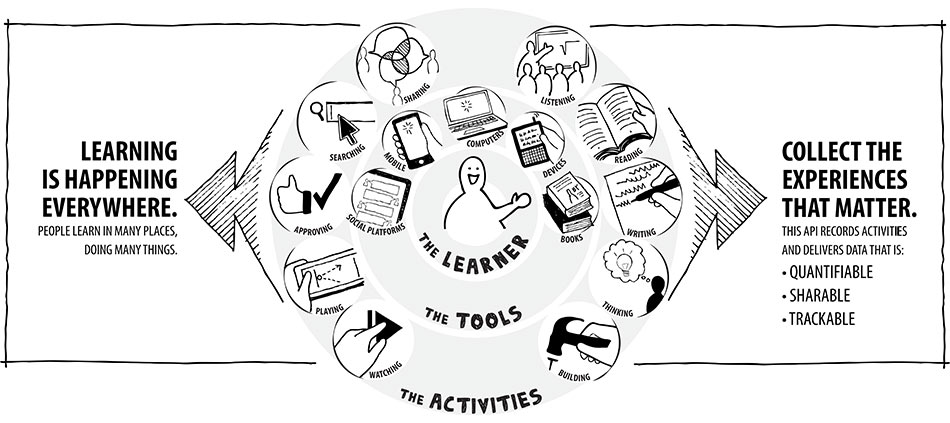
The Tin Can API (sometimes known as the Experience API or xAPI) is a brand new specification for learning technology that makes it possible to collect data about the wide range of experiences a person has (online and offline). This API captures data in a consistent format about a person or group’s activities from many technologies. Very different systems are able to securely communicate by capturing and sharing this stream of activities using Tin Can’s simple vocabulary.

Previous specifications were difficult and had limitations (see Tin Can vs SCORM), but the Tin Can API is simple and flexible. It lifts many of the older restrictions. Mobile learning, simulations, virtual worlds, serious games, real-world activities, experiential learning, social learning, offline learning, and collaborative learning are just some of the things that can now be recognized and communicated well with the Tin Can API.

It’s important to know that we don’t own the Tin Can API. ADL is the steward of the specification. We just know this space so well that ADL asked us to help develop it. The Tin Can API is community-driven, and free to implement.

How does the Tin Can API work?

  • People learn from interactions with other people, content, and beyond. These actions can happen anywhere and signal an event where learning could occur. All of these can be recorded with the Tin Can API.
  • When an activity needs to be recorded, the application sends secure statements in the form of “Noun, verb, object” or “I did this” to a Learning Record Store (LRS.)
  • Learning Record Stores record all of the statements made. An LRS can share these statements with other LRSs. An LRS can exist on its own, or inside an LMS.

The freedoms of the Tin Can API

  • Statement freedom: the structure of “statements” using nouns, verbs and objects lets you record almost any activity. Think: “I did this.”
  • History freedom: the Tin Can API allows LRSs to talk to each other. LRSs can share data and transcripts with one another, and your experiences can follow you from one LRS (or organization) to another. Learners can even have their own “personal data lockers” with their personal learning information inside them.

  • Device freedom: any enabled device can send Tin Can API statements (mobile phones, simulations, games, a CPR dummy, the list goes on). A constant network connection isn’t necessary — occasional connectivity is fine.
  • Workflow freedom: tracking learning events doesn’t have to start or end in an LMS, it can start wherever the learner is and on whatever device they choose to use. Your content isn’t tied to an LMS.

I want to dive deeper

If you want to realize the full implications of the Tin Can API, check out “The Layers of the Tin Can Onion” by Mike Rustici. You can also download the full Tin Can API specification here.

Tin Can API for Moodle users

  1. Launch externally Tin Can API activities from
  2. Launch externally Tin Can API activities from Moodle and track on any LRS. Compatible with Storyline, Captivate and others! Maintained by: Picture of Andrew Downes Andrew Downes
  3. Implement Experience API (Tin Can) - Moodle Experience API (formally called Tin Can) is the new version of SCORM - the commercial Rustici SCORM plugin for Moodle supports Tin Can

The Tin Can API and Rustici Software

ADL, the keepers of SCORM, issued a BAA asking for ideas for the next generation of SCORM. We applied, and they asked us to research what the next-generation e-learning specification could/should look like.

Mobile Apps Will Transform All Business Processes

Mobile Apps will transform all business processes. Over the next two years most companies will be using mobile apps (developed in house or bought off the shelf) to help them with such things as supply chain management, logistics, purchasing, maintenance, training, services, or sales support. Let’s face it, two years is a short amount of time considering there’s such a low percent of mobile apps for business functions today.

So, what does all this mean for your business?

It means that mobile apps designed by businesses for their internal use and competitive advantage will explode over the next two years. Therefore, all business leaders need to ask themselves: “Two years from now, do I want to be one of the companies that is not developing mobile apps to transform business processes?” Once you see the hard trends driving this software revolution, it would be hard to answer “no.”

Remember, a hard trend will happen; a soft trend might happen. The hard trend is that businesses will be developing mobile apps customized for their company for various functions. The soft trend is whether your company will be one of them.

Here’s something else to consider: The number of smart phones and tablets in all sizes of companies has obviously exploded in the last couple of years, and this hard trend is picking up speed. At the same time, the cost of being able to deploy business intelligence in every function is dropping off a cliff just as the capability of our smart devices, of our wireless and wired networks, and of both private and public clouds grows.

So with costs decreasing and capabilities increasing, the time to act is now. The question is, “How?”

The key is to assess whether you have the in-house capabilities to develop mobile apps. Some companies do, and some companies don’t. It depends on the size of the business and your IT department. However, a lot of young people do have the capabilities needed. Therefore, I would suggest that you hire or “rent a kid.” In other words, if you don’t already employ some talented young people who have both the interest and knowledge to develop mobile apps, it’s time to bring some in. They have a lot of present and future value to offer, but they do not know your needs and business requirements.

So you need to have the core competency of developing your own mobile apps for business processes that can give businesses a competitive advantage. The companies that transform their business processes using mobility will achieve new levels of success. The time for business process transformation is now.

Article by:Daniel Burrus Daniel Burrus is considered one of the World’s Leading Futurists on Global Trends and Innovation, a top LinkedIn Global INfluencer, and is the founder and CEO of Burrus Research

IT Trends Effecting Online Training

Here is the list of IT trends effecting online training and education. Most of you involved in elearning have embraced the first six points of this article. I suggest you pay more attention to the items 7 to 12. The following is the summary of the article by DANIEL BURRUS.

No matter what industry you’re in, your company can’t survive without technology. From smart phones and tablets to mobile apps and cloud-based technology, there’s a plethora of technological advancements to not only keep track of, but also to profit from.

To stay competitive, every organisation needs to anticipate the most significant technology trends that are shaping their business and changing their customer, and then develop innovative ways to use them to their advantage, both inside and outside of their organisation. Remember, if it can be done, it will be done. If you don’t use these technologies to create a competitive advantage, someone else will.

Over the next five short years the following game-changing technologies will transform how we sell, market, communicate, collaborate, educate, train, innovate, and much more.

1. Big Data Gets Bigger and Becomes a Service.

Big Data is a term to describe the technologies and techniques used to capture and utilize the exponentially increasing streams of datawith the goal ofbringing enterprise-wide visibility and insights to make rapid critical decisions. Companies are learning the hard way that Big Bad Data can get you into trouble fast, so there is a new push to focus on the quality of the data as it is being captured.

  • High Speed Analytics using advanced cloud services will increasingly be used as a complement to existing information management systems and programs to tame the massive data explosion. This new level of data integration and analytics will require many new skills and cross-functional buy-in in order to break down the many data and organizational silos that still exist. The rapid increase in data makes this a fast-growing hard trend that cannot be ignored.
  • Big Data as-a-Service (BDaaS) will emerge this year as cloud providers offer midsize and smaller organizations access to much larger streams of relevant data they could not tap into otherwise.

2. Cloud Computing Gets Personal and Advanced Cloud Services will be increasingly embraced by business of all sizes, as this represents a major shift in how organizations obtain and maintain software, hardware, and computing capacity. As consumers, we first experienced public clouds (think about when you use Google Docs or Apple’s iCloud). Then we saw more private clouds giving companies the security and limited access they needed, as well as hybrid clouds that provided both, giving customers and consumers access to specific areas of a company’s cloud. Companies of all sizes are using the cloud to cut costs in IT, human resources, and sales management functions. As individuals increasingly use personal mobile clouds, we will see a shift to services and less of a focus on the devices we use to access our services. This shift will also help us address the three limiting factors of mobility: battery life, memory, and processors.

3. On Demand Services will increasingly be offered to companies needing to rapidly deploy new services. Hardware-as-a-Service (HaaS) is increasingly joining Software-as-a-Service (SaaS), creating what some have called “IT as a service.” The rapid growth of Collaboration-as-a-Service (CaaS), Security-as-a-Service (SaaS), Networking as-a-Service (NaaS), and many more are all giving birth to Everything as-a-Service (XaaS). As a result, IT departments in all industries will be increasingly freed to focus on enabling business process transformation, which will allow organizations to maximize their return on their technology investments.

4. Virtualisation of Storage, Desktops, Applications, and Networking will see continued acceptance and growth by both large and small businesses as virtualisation security improves. In addition to storage, we will continue to see the virtualisation of processing power, allowing mobile devices to access supercomputer capabilities and apply it to processes such as purchasing and logistics, to name a few.

5. Consumerisation of IT increases, as consumers become the driving source for innovation and technology, which is fueled by rapid advances in processing power, storage, and bandwidth. Smart companies have recognized that this is a hard trend that will continue and have stopped fighting consumerization. Instead, they are turning it into a competitive advantage by consumerizing their applications, such as recommending safe and secure third party hardware and apps. Encouraging employees to share productivity enhancing consumer technology will become a wise strategy.

6. Wear Your Own Device (WYOD) will take off this year as wearable technology goes mainstream with big players launching smart watches, smart glasses, and more, creating new problems as well as opportunities for organizations of all sizes. Over the past few years, Bring Your Own Device (BYOD) caught many IT departments by surprise; it’s now time to get in front of this this predictable hard trend and turn it into an advantage.

Are you ready to take your course online follow our free step by step advise on this site, and for those interested to design their course on Moodle platform we offer a free online course.

7. Gameification of Training and Education will acceleratea fast-moving hard trend ofusing advanced simulations and skill-based learning systems that are self-diagnostic, interactive, game-like, and competitive, all focused on giving the user an immersive experience thanks to a photo-realistic 3D interface. Some will develop software using these gaming techniques to work on existing hardware systems such as both old and new versions of Xbox and PlayStation. A social component that includes sharing will drive success.

8. Online Learning and Massive Open Online Courses (MOOC) have been embraced by highly recognized and traditional educational institutions, putting them in a position to challenge all educational systems by making Location and Tuition far less of a barrier to receiving the information, training, and knowledge people need to know in order to succeed in a rapidly changing world. This hard trend, combined with Gameification systems, will change the face of global education.

9. eBooks, eNewspapers, eMagazines and Interactive Multimedia eTextbooks are finallypassing the tipping pointdue to the abundance of smart phones and tablets that provide a full color experience, and publishers providing apps that give a better-than-paper experience by including cut, copy, paste, print, and multimedia capabilities. Interactive eTextbooks will finally take off thanks to easy-to-use software such as Apple’s iBook Author and other competing tools, freeing new publishers to create compelling and engaging content, and freeing students from a static, expensive, and literally heavy experience.

10. Social Business Applications take on a new level of urgency as organizations shift from an Information Age “informing”model to a Communication Age “communicating and engaging” model. Social Software for business will reach a new level of adoption with applications to enhance relationships, collaboration, networking, social validation, and more. Social Searchand Social Analytics will increasingly be used by marketers and researchers, not to mention Wall Street, to tap into millions of daily tweets and Facebook conversations, providing real-time analysis of many key consumer metrics.

11. Smart Phones & Tablets Get Smarter with the rapid advances in processing power, storage, and bandwidth. Smart phones have already become our primary personal computer, and the Mobile Web hasbecomea must-have capability. An Enterprise Mobility Strategy Becomes Mandatory for all size organizations as we see mobile data, mobile media, mobile sales, mobile marketing, mobile commerce, mobile finance, mobile payments, mobile health, and many more explode. The vast majority of mobile phones sold globally will have a browser, making the smart phone our primary computer that is with us 24/7 and signaling a profound shift in global computing. This new level of mobility and connectivity by many millions around the world will allow any size business to transform how they market, sell, communicate, collaborate, educate, train, and innovate using mobility.

12. Mobile Apps for Business Processes such as purchasing, supply chain, logistics, distribution, service, sales, maintenance, and more will grow rapidly. There will be an increasing focus on Business App Stores within companies giving users access to personalized information they need on their mobile devices anytime and anywhere.

Posted by: Daniel BurrusDaniel Burrus

Moodle - Frequently Asked Questions

Moodle - Frequently Asked Questions

Can I change the look and feel of my Moodle site?

Moodle sites have a little less flexibility than courses, but there are still quite a few changes that can be made to customize your site. Your Moodle administrator will be able to discuss these with you. One of the more important features is Categories and Subcategories, which will layer your site instead of simply displaying every single course on the site off the first page.

A Free Guide on How to Take Your Course online from The Educators

It is incredibly focused, with a refreshingly simple approach. And it covers, course design, elearning technology, marketing your course online and so much more!

You can also display arbitrary blocks of text, HTML, images, audio or web links.

Can I change the title of a teacher/tutor in Moodle?

Not easily. Each Moodle site has a number of “Roles” set up (e.g., Staff and Student). The site administrator can set up additional roles with any name and with appropriate permissions. Once available users can be assigned to these new roles within courses.

Additionally, you can change the names of existing Roles in a Course’s settings page.

Can I change the look and feel of my Moodle course?

Yes. Moodle courses, when created, have several blocks by default as well as a news forum. When you turn the editing on for your course, you will see arrows that allow you to move each individual block or delete individual blocks that you feel are unnecessary for your purposes. There are also additional blocks from a drop down menu that may be better suited to your course. (Any deleted blocks can be re-added at anytime from the block drop down menu which never disapears). You may also move the blocks around the page so that you have two columns instead of three. You can choose to present your course in weekly, topic or social format. Finally, you can add images and a variety of other tools to shape your Moodle course the way you want to.

The Educators support team can offer further specific advice regarding course design upon request.

Can I edit things in Moodle easily?

You can always go back and edit a resource or an activity that you have created in Moodle by choosing the ‘update’ option (once your editing is turned on). You can also move resources or activities in Moodle by choosing the up/down arrow icons beside the resource or activity (again, once your editing is turned on). If you have uploaded a document to the Moodle files section and wish to make a change, you will need to make the change locally and then re-upload the file. If you don’t immediately see the changes, you may need to empty your cache/history in your web browser.

Can I have more than 10 choices in the Choice Activity?

Yes. Complete the first 10 and save the choice. Go back and update the Choice and you will see you have more choices. You may have to do this multiple times if you have large numbers of options.

Can I hide sections of a course from students and reveal them one at a time?

Yes. Beside each Topic Block in a Moodle course (and each individual resource or activity) you will see an eye icon (when your editing is turned on). If you click the eye so that it is closed, this entire block will be hidden from students on a course. Clicking the eye again will open it. This can not be done automatically, however.

Can I let people from outside to look at and participate in my Moodle course?

Yes. Increasingly, lecturers and course teams are interested in inviting expert guest lectures to participate in a Moodle course for a given period of time, or to invite colleagues from other institutions to collaborate in a Moodle environment.

Can I look at the content of a course in Moodle without enrolling in the course?

Generally, no. It is possible to set up a Moodle course to allow guest access, but this is rare and guests can not participate in activities. External users to your Moodle courses and programmes can be given a manual ID account that authenticates their user information and details appropriately.

Can I move things in Moodle easily?

It is generally the case that there is nothing in Moodle that becomes set in stone. You can always go back and change things later. Resources and Activities in courses can be moved about at will. With editing on, look for the double arrow icon to the right of each resource/activity/block. Once you’ve clicked the double arrow icon your screen will change and you will see several blank boxes. Click on the blank box where you wish to move your resource/activity/block.

Can I put audio files into Moodle?

Yes, you can upload audio files into Moodle like any other file resource up to the maximum file size allowed for your Moodle site. You should ensure that the files have been recorded or re-encoded as MP3 files. Moodle contains a built-in player for MP3 files.

Can I put video into Moodle?

Yes, you can upload video files like any other file resource up to the maximum size allowed by your Moodle site. As video files can be large this probably means that they will need to be small, short and of low resolution. You are strongly recommended to encode video files in Flash Video format (see http://en.wikipedia.org/wiki/Flash_Video). For larger video files you may wish to consider using YouTube.

Can I put my Power Point files into Moodle?

Yes. Note, however, that there are issues with the size of PowerPoint files. They tend to contain additional information that is not required for display only and embedded graphics are often much larger than they need to be. In extreme cases your PowerPoint may be too large to upload to Moodle. Microsoft has some advice on reducing file sizes here: http://office.microsoft.com/en-us/powerpoint/HA011168821033.aspx

Can I put plain text or formatted text into my Moodle course without having to use a resource?

It is not possible to put text into Moodle without using a resourse or activity. You can, however, use labels from the resource dropdown to add text to the front page of your Moodle. Each topic box in a course also has an area or adding header text.

Can I upload multiple files to Moodle at the same time?

Uploading files in Moodle is, unfortunately, not as easy as weí would like (However, feature requests for drag and drop in future have been made). You can upload several files to Moodle at once if you use zip. Zip the files on your PC and upload the zip file to your Moodle course. In your course sites files in Moodle, you will see an “unzip” option next to the file. This can be used to transfer (for example) whole websites into Moodle.

Can I share my Quizzes with other courses?

Yes. Quizzes in Moodle are made from banks of questions that you create. You can then sort them into categories which can be ‘published’.

By default all questions that you create will go into the “Default” category, but you can (and probably should) create new categories to organise your questions. A questionbank can be shared with other courses - this must be done by your Moodle administrator. If you wish to share questions with another moodle site, a category can be exported. There are a number of formats but the Moodle XML format is the most comprehensive. These can then be imported at the other site.

Can I upload multiple files to Moodle at the same time?

Uploading files in Moodle is, unfortunately, not as easy as weí would like (However, feature requests for drag and drop in future have been made). You can upload several files to Moodle at once if you use zip. Zip the files on your PC and upload the zip file to your Moodle course. In your course sites files in Moodle, you will see an “unzip” option next to the file. This can be used to transfer (for example) whole websites into Moodle.

Can Moodle handle diagrams, mathematical symbols and foreign character sets?

Yes. Moodle has the ability to display complex mathematical formulae, diagrams etc. using TeX. This uses the Moodle “filter” feature, so the TeX filter must be enabled for you by your Moodle Administrator. The TeX filter generates graphical representations so no additional software or fonts is required on viewing computers. Moodle is fully Unicode and can handle a huge range of international characters. Note, however, that you still need to ensure that the required fonts are available on the client computers.

Can students download and print Power Points, Word Documents, etc in Moodle?

Yes. However, lab set-ups and individual PC settings can create minor difficulties with this. If you have experienced a problem with this, please contact the IT Services Help Desk.

Can Students upload documents in Moodle?

Yes. Students can upload documents in the assignment, database and the forum activity, as long as you (as tutor) have set the activities to allow for this.

Can you be anonymous in Moodle?

Generally, no. However, some areas are more private than others and certain information will be kept from other Moodle users (for example, fellow students). An exception to this is the Feedback activity which can be set to be anonymous.

Can you have a live conversation in Moodle?

Live conversation (also called synchronous communication) is possible with the Moodle Chat Activity

Can you have separate groups of students in a Moodle course?

Yes, a feature called ‘groups’ allows you put students into different groups which can either be ‘visible’ or ‘separate’. In the former other course members can read, but not interact or respond to the contributions of other groups, in the latter case the other groups are effectively invisible to non-members. Students can be in multiple groups in a course. Look for the Groups option in the course Administration block.

Do I have to be on campus to login to Moodle?

No. Moodle is web-based which means that you can login from anywhere in the world as long as you have an internet connection and the appropriate Login, Password and enrolment key (if required). Moodle courses can be set up to be inaccessible off campus for security, but this is rare.

Do I have to have forum posts emailed to me?

No. Most forums should give you the option of having posts emailed to you. This is called being ‘subscribed’. If your forum has been set up to force subscription then ask whoever set it up if this is intentional. If you are going on holiday or will otherwise be unable to respond to Moodle emails you can set an option in your profile to stop all emails. You can also set an option in your Profile to receive a “digest” (once a day) of all forum posts generated.

Access your profile by clicking on your name at the top or bottom of each screen once you are logged in.

Do I have to know HTML to format my Moodle pages?

No. the HTML editor (similar to the tool bar for formatting in WORD) turned on (although you can choose to disable this within your own personal profile if you prefer to write your own HTML).

If you do choose to disable the HTML editor in your personal profile then you have other choices such as Plain Text (no formatting), Moodle-Auto Format (once you save your resource Moodle will do such things as make URLs and email addresses into live links) and Markdown (tries to make it easy as possible to type well-formatted XHTML pages using nothing but text).

Do staff see the same thing that students see in Moodle?

Yes and No. Everyone in a Moodle course will see Resources (PDFís, Word Documents, Moodle Resources, Websites) in roughly the same manner, depending on the web browser you are using and the various settings on your computer. However, activities (Quizzes, Assignments, Lessons, Forums, etc) can look dramatically different from a staff and student view.

Each course page has a “Switch role to…” drop-down at the top right, which will let you see what other types of user see (e.g., Students). Note that this is not completely accurate for Administrators and is not available to Students at all.

Does it matter which browser I use to access Moodle?

Moodle supports all popular browsers. You are strongly encouraged to upgrade to the latest version of the browser you use. There are some pros and cons, for example Mac’s Safari browser has built in spell-checking yet will not support the HTML editor. The best all-round recommendation is probably Firefox (http://www.mozilla.com/firefox) but ultimately it is a personal choice.

Does Moodle have a questionnaire function for online feedback?

Yes. Moodle has an optional activity module called Feedback which can be used to create online questionnaires or feedback surveys for your courses.

Does Moodle have drag and drop features?

Moodle does have some drag and drop features but these can be disabled by the administrator.

Does Moodle keep logs on your participation? Can we turn this off?

Yes, Moodle does keep logs, and no it cannot be turned off. This information is required to ensure that the system provides information based on your login details and activity logs are a side-effect of this.

Enrolment - How do I join a course?

Once you have logged in successfully you can select the course you want to participate in. You will be prompted to make a payment, If you are prompted for an enrolment key use the one that your lecturer has given you. This will enrol you in the course. You can now access the full course. From now on you will only need to enter your username and password to log in and access any course you have already enrolled in.

Note that the enrolment key can only be provided by your lecturer or administration.

External Access - I have problems logging in from home.

You might have problems logging in if your computer has a firewall, for example ZoneAlarm or Norton Security. For those using ZoneAlarm, here is the fix:

1. Open ZoneAlarm Privacy properties
2. On the Site List tab click Add button and add the VLE site to the list
3. Once listed, right click the site and select Options from the context menu
4. In the Site Options property window uncheck everything on the Ad Blocking tab and then click Apply.
For those using Norton firewall, the fix is available at the Symantec Support website.

External Access - Is it possible for me to access the course from my home computer?

Because Moodle is web based, access is not limited to campus.

How do I unenroll from a course?

If you are enrolled in a course that you should not be on or wish to unenroll from a course you should contact the course tutor and ask to be manually removed.


How do tutors get access to their Moodle course?

Moodle administrators will add the appropriate tutors to the appropriate courses. Alternatively, those already with tutor access can give access to additional tutors.

Tutors should not attempt to access a course using the Enrolment Key as this will make them a student in the course.

How does email work with Moodle?

There are several activities within Moodle that have an email function. It is possible to set up Forums, Glossaries and Messaging in Moodle to automatically email you to alert you to communications within these activities. As a tutor, you can force some of these options, should this be appropriate.

Most sites also have the Quickmail Block (you can add this to your course via the Blocks block with editing on). This allows you to mail all students or groups of students on the course.

You should never rely on email for important communications with students. There is no way to ensure that they have received and read the communication.

I am having trouble with my Power Point files in Moodle?

If your Power Point files gives the error message that says “a required parameter is missing”. This means, the file is probably larger than the maximum permitted by your Moodle Site. If this is the case you will need to reduce the size of the file. Microsoft has the following information: http://office.microsoft.com/en-us/powerpoint/HA011168821033.aspx. The LTU can provide further advice.

What are the optional features that can be added to Moodle?

Moodle is “plug-in” based and there is a large library of additional features that can be added to a Moodle installation. Decisions about additional plug-ins for Moodle sites are made by the Learning and Technology Unit. If you have any specific requirements or requests regarding additional plug-ins, you should contact the the support team.

I used to be able to login to Moodle but now when I enter my password, it comes up invalid.

There are two possibilities with this:

1.) At the start of the new academic year, you are given 6 opportunities on campus machines to change your password. If you have not done this, your password will expire and you will no longer be able to login to Moodle.

2.) If your name has changed for any reason then you may find you can no longer access your courses in Moodle once Registry have updated your details. There are two steps you should take: (1) Contact the support team and ask them to update your Moodle profile.

Please note that this can take a day or two to sort out.

Is my Moodle course backed up automatically?

Moodle sites are backed up regularly. Please note that this is a disaster recovery backup - you will not be able to restore an individual course if you make a mistake. Moodle has a built it backup facility that enables any course to be downloaded in a proprietory backup format. You are encouraged to do this before making drastic changes to a course.

Is there a limit to the size of a file you can upload to Moodle?

Each Moodle Site has an upload limit. This is typically 64MB. However, this can be reduced in a number of different places in Moodle (e.g., course, forum attachments), so you may be further restricted. You should speak to your site’s Administrator if this is a problem, but do remember that very large files may be problematic for users with slow Internet connections. It is good practice to keep file sizes as small as possible.

Is there a spell checker in Moodle?

Yes, but it is not currently turned on. We would recommend the use of a browser such as Firefox 2 (http://www.mozilla.org/firefox) or Safari (http://www.apple.com/safari) that has it’s own spell checker built in. Add-ons for Internet Explorer to provide spell checking are available. These client solutions are generally much more satisfactory than server based ones.

Scrolling up and down in Moodle is annoying when you are working on a large course. Is there a way to make this easier?

Yes. When you turn the editing on in a Moodle course you will see that each Topic Block has two small square icons (to the upper right). Clicking on the top one will collapse your Moodle course, allowing you to just view and work on a single Topic Block. Clicking on the icon again will return all your Topic Blocks to view.

What are all those blocks in Moodle?

When a Moodle course is created it automatically generates several blocks that allow you to control how you navigate or find information in Moodle (examples of these include the ‘participants’ block, the ‘search forums’ block or the ‘calendar’ block). In addition to the blocks that automatically appear, you will notice that you have several options for further blocks of tools (from the Block drop down menu when your editing is turned on) to add to your course (examples of this include the ‘RSS’ block, the ‘Quickmail’ block or the ‘Blogs’ block). Similarly, you can delete any of the existing blocks if you feel they are unnecessary to your course and you can also move the blocks so that they appear on a single side rather than on either side of the middle content (this can only be achieved using the move or delete buttons with the editing turned on).

What are Roles?

Roles are superficially things like “Students”, “Staff”, “Administrators”. Users are assigned to a role within parts of of the Moodle site (for example and usually, a course). The role is just a large collection of permissions (for example, “user is allowed to post in a forum”). The site Administrator can create new roles if needed.

What are the summaries in Moodle for?

The summaries section that appears when you are building a resource and (sometimes) an activity is mostly for navigation purposes and for ease of use. Moodle courses can often become very large and rich with documents that may be difficult to wade through. If you have filled out the summary box effectively, then users can click on the ‘Resources’ or ‘Activities’ list and see, at a glance, a full list of every resource or activity, complete with a quick summary of what each one entails.

What do I do with my Moodle course when it is finished and I want to run it again in the next academic session?

The first thing you must decide is whether or not the user information that is stored in your old course is worth keeping (for your department, for your students, for the sake of records, etc.) Often when a Moodle course has had interactive components such as quizzes, forums, etc., then it is a good idea to allow students to have continued access to this information after the course ends. If this is the case for you, then there is a backup and restore feature in Moodle that will allow you to make a copy of your course that is clean (ie. without user data, but keeping all the content you have created). Typically, Moodle Administrators will create a category called Archive on your Moodle site and you can request that they move your older copy of the course into that category, leaving your newly restored course where it was.

If, however, you do not wish to keep an archive of the course, there is also a course reset feature that removes users and user content from your course (NOTE: UNTICK TEACHERS IN THE RESET OPTIONS displayed after you select the option in the Course Administration block, or you will remove yourself).

What does it mean if I get an error message that says ‘This course is not enrolable’?

If you are trying to access a course and Moodle tells you that the course is not enrolable, then there are a few things to try:

1.) Check with websurf to ensure that your information is correct and that you really are a student in this course.

2.) Check with your tutor to ensure that they have not set up the course as a ‘metacourse’ and sent you to the wrong location (metacourses do not allow individual students, but rather, child courses, therefore you must be enrolled in one of the child courses to access the metacourse).

What is a metacourse in Moodle?

A metacourse is a special kind of course that does not accept students/participants, but rather “child courses”. An example of a good use of metacourses can be seen when they are used as Common Rooms for programmes such as Honors or Post graduate courses where students are taking many options within a programme but still need a single space to come together and access information, socialise, etc.

A further and more detailed explanation of metacourses can be found here: http://docs.moodle.org/en/Metacourses

What is a profile in Moodle?

Each user has a profile - a list of information about them. Only a small number of items are compulsory. The compulsory fields are required to complete your profile. Even if your profile is created automatically it is a good idea to check the information it contains.

What is a staff role in Moodle?

A staff role in Moodle is typically a tutor or teacher, but can sometimes be administrative staff. A staff role gives full access to write, alter, upload and create content within a given Moodle course. Staff in a Moodle course can also add additional tutors to the course. Moodle allows this name to be specified on a course by course basis.

What is a student in Moodle?

A student in Moodle is a role that gives student level access to a given Moodle course, allowing a participant in this role to view materials and participate in activities that have been set up in advance by the course tutor. The role you are assigned is on a course by course basis (ie, you can be a student in one course and a lecturer in another).

What is a VLE?

VLE stands for Virtual Learning Environment, and refers to an online, web-based tool that allows staff and students to communicate, collaborate and build communities around learning. Other terms used interchangeably are LMS (Learning Management System), OLE (Online Learning Environment) and CMS (Course Management System).

What is an administrator in Moodle?

An Administrator in Moodle is a particular term and should not be confused with regular Administration staff at the institute. The Moodle Administrator for a given Moodle site is the person who has full access to all settings and panels within the site, the power to grant access, create courses, make alternations at a technical level and adjust some code.

What is an enrolment key?

An enrolment key is one way of securing your Moodle course . The Key is a onetime key, usually an appropriate word, that students/participants are given to access the course. Typically lecturers advise students of this key word in a face to face lecture.

What is Mahara?

Mahara provides the tools to set up a personal learning and development environment. It is available for you to use during your time at the University. It can provide a wide-ranging view of your learning and development over different subject areas and throughout your studies.

Where can I find Moodle documentation?

There is a great deal of context sensitive help built into Moodle. In many places (especially next to where choices can be made) you will see the help button - a small question mark in a (normally yellow or blue) circle. This will provide immediate help on that issue. There is also a comprehensive documentation site available at http://docs.moodle.org.

What is Moodle?

Moodle is an online learning tool or VLE (Virtual Learning Environment). It is used to communicate, collaborate and build communities around learning. It is the most widely used VLE in the world and has been adopted by several leaders in online education. Moodle can be seen as an online course workspace to store course files and build interactive learning activities. It is an easy way for staff and students to use the web for teaching and learning and can be accessed from any internet connection in the world.

Who has the ability to alter the content in my Moodle course?

Anyone who is listed as staff in your course and has editing rights can alter the content. Moodle Administrators or Course Creators typically set up courses and add staff as requested.

Why do I get a blank screen when I try to open a Powerpoint or other Office documents in Internet Explorer?

If you are finding that PowerPoint documents (and Word, Excel etc) don’t display well in your Internet Explorer (IE) browser, either prompting you for a password or just showing a blank screen, then you are encountering a well-known problem with IE.

The best solution is to alter your settings so that IE doesn’t try to embed the Office documents within it’s own display, and instead, will download the document and tell PowerPoint to display the document normally (as a helper application).
Here’s how to change the setting (in Windows):
1. Double-click My Computer.

2. On the Tools menu, click Folder Options.

3. On the File Types tab, in the Registered file types box, click to select the file type that you want to change. For example, click to select PPT Microsoft PowerPointPresentation.

4. Click Advanced.

5. In the Edit File Type dialog box, click to clear the Browse in same window check box, and then click OK.

6. Click Close to close the Folder Options dialog box.
Alternatively you can use a different browser like Firefox, Mozilla or Opera.

What Matters in Training and Development

The Science of Training and Development in Organizations:

What Matters in Practice

Companies know that they need to encourage the continued learning and development of their workforce in order to stay on top in their field. Because a trained workforce can provide a competitive advantage to companies, it makes sense to implement the best training program possible — especially one guided by sound science.

Each year, organisations in the United States spend roughly $135 billion on employee training.

In this article, Salas (University of Central Florida), Tannenbaum (The Group for Organizational Effectiveness), Kraiger (Colorado State University), and Smith-Jentsch (University of Central Florida) describe the current state of the science and practice of training, discuss why organizations should care about employee training, and outline processes for creating the most effective training program possible.

Training research and practice have greatly advanced within the last 30 years, moving from what was once described as a “nonempirical” field to one based on science. Research not only has shown that well-designed training programs work, but also has provided insights into what makes a program effective. According to the authors, what occurs during training is not the only thing that matters; what occurs before and after training is just as important for program success.

Based on past research, the authors suggest several steps that should be taken before, during, and after training to maximise a program’s impact.

Before:

Research indicates that organizations should take steps before training to create an appropriate learning climate and conduct a Training Needs Analysis — a diagnosis of what needs to be trained, to whom, and in what organisational system.

During:

During training, organizations should take steps to create the right trainee mindset and should use training strategies that utilize appropriate instructional principles.

After:

After training, employers should ensure that transfer of the training has occurred and should evaluate the training methods to see if any improvements could be made.

By becoming informed about and active in the training process, business leaders and policy makers can positively influence the scientific rigor — and therefore effectiveness — of training at their organisations, thus maximising the potential of their workforce and of their organisation as a whole.

About the Authors (PDF)

Editorial: Commentary on the Science of Training and Development in Organizations: What Matters in Practice

By Paul W. Thayer - Read the Full Text (PDF)

How To Build a Profitable eLearning Business

Unicorn CEO, Peter Phillips asks why are there so few global players in the business of eLearning development and what are the keys to survival and growth in the highly competitive eLearning industry?

Over Unicorn’s 25 years, we have seen the evolution of the bespoke eLearning business from a small fragmented cottage industry into today’s much larger fragmented cottage industry. So what differentiates your bespoke eLearning business? Is it great writing, great design, a specialist eLearning industry focus? Or something else altogether…..

Here are a few suggestions for having a profitable bespoke business.

1- Raise barriers to entry

The eLearning industry has always suffered from low entry barriers. These have made for plenty of competition, but also driven down margins and, in the longer term, that constrains growth. In the early days, there were some excellent authoring tools around, but these required a degree of technical programming skill to use them effectively. The rise of rapid development tools that don’t require coding skills such as the PowerPoint Add-ins from Articulate and iSpring, have lowered entry barriers further.

2- Create switching costs

Bespoke eLearning companies need a constant stream of new business and when switching costs for your clients are low and price competition fierce, stable growth is tough.

3- Employ great Instructional Designers

There is still one important constraint on new entrants - instructional design skills. Anyone with experience of the eLearning industry knows how difficult it is to find good instructional designers who understand the subject matter, the principles of effective learning and have the creativity to be able to engage the learner. These skilled resources are a key limit on the ability to maintain high quality when trying to grow fast, although that has not always been a sufficient deterrent. We’ve all winced at examples of ‘Click Next 150 times then answer three badly written questions’!

4- Outsource non-core activities

Over the past decade, better communications have exposed providers to global competition, resulting in further downward pressure on prices, but also opportunities for cost saving through offshore outsourcing and crowd sourcing. Unfortunately potential cost savings are rarely fully realised as the reduced direct costs can be outweighed by additional management costs in ensuring that quality, creativity and cultural relevance are not compromised.

5- Two plus two doesn’t equal four

A strategy of growth through acquisition requires a very different skill set from organic growth. The history of the eLearning industry is littered with failed or overpriced mergers and acquisitions. A public listing is only for the brave, the deluded or those looking for a quick exit before it all goes pear-shaped! The tarnished history of mergers and acquisitions highlights there are few advantages in size in bespoke eLearning companies, and management problems tend to multiply as teams get larger and more dispersed.

6- Find your niche

A route to profitable growth is apparent in the examples of successful niche players, who focus on market verticals where they have specialist expertise and can talk the language of their clients. Whether it is oil and gas, pharmaceuticals, healthcare or, as in Unicorn’s case, insurance and banking, you can create strong barriers to entry and high switching costs, and build profitable, enduring business relationships.

The exponential rise of mobile platforms expands the market and brings in more players, but the basic economics are unchanged.

We will continue seeing new entrants with new ideas and a low cost base challenging the established players in an increasingly global cottage industry.

We have developed a series of simple instructions on how to take your course online, freely available to any visitor to this site. For this free guide visit the Going Online Page.


Peter Phillips

As Unicorn CEO, my role is to communicate the Unicorn values, drive innovation and growth, and help to make Unicorn a fun place to work.

Check Unicorn’s LinkedIn page.

Website: www.unicorntraining.com/

via 6 Keys To A Profitable Bespoke eLearning Business.

learning style

learning strategies

What’s the key to effective learning? One intriguing body of research suggests a rather riddle-like answer:

It’s not just what you know. It’s what you know about what you know.

To put it in more straight forward terms, anytime a student learns, he or she has to bring in two kinds of prior knowledge: knowledge about the subject at hand (say, mathematics or history) and knowledge about how learning works. Educators are pretty good at imparting the first kind of knowledge. We’re comfortable talking about concrete information: names, dates, numbers, facts. But the guidance we offer on the act of learning itself—the “metacognitive” aspects of learning—is more hit-or-miss, and it shows.

“Metacognition” is often simply defined as “thinking about thinking.”

Metacognition refers to higher order thinking which involves active control over the cognitive processes engaged in learning. Activities such as planning how to approach a given learning task, monitoring comprehension, and evaluating progress toward the completion of a task are metacognitive in nature. Because metacognition plays a critical role in successful learning, it is important to study metacognitive activity and development to determine how students can be taught to better apply their cognitive resources through metacognitive control.

In most of the teaching institutions, “the emphasis is on what students need to learn, whereas little emphasis—if any—is placed on training students how they should go about learning the content and what skills will promote efficient studying to support robust learning,”John Dunlosky, professor of psychology at Kent State University in Ohio”

Teaching students how to learn is as important as teaching them content, because acquiring both the right learning strategies and background knowledge is important—if not essential—for promoting lifelong learning.”

Research has found that students vary widely in what they know about how to learn, according to a team of educational researchers from Australia writing last year in the journal Instructional Science. Most striking, low-achieving students show “substantial deficits” in their awareness of the cognitive and metacognitive strategies that lead to effective learning—suggesting that these students’ struggles may be due in part to a gap in their knowledge about how learning works.

Teaching students good learning strategies would ensure that they know how to acquire new knowledge, which leads to improved learning outcomes. Students who use appropriate strategies to understand and remember what they read, such as underlining important parts of the texts or discussing what they read with other people, perform mush better (equivalent to one full school year) in their assessments.

A Free Guide on How to Take Your Course online from The Educators

It is incredibly focused, with a refreshingly simple approach. And it covers, course design, elearning technology, marketing your course online and so much more!

Students can assess their own awareness by asking themselves which of the following learning strategies they regularly use (the response to each item is ideally “yes”):
• I draw pictures or diagrams to help me understand this subject.
• I make up questions that I try to answer about this subject.
• When I am learning something new in this subject, I think back to what I already know about it.
• I discuss what I am doing in this subject with others.
• I practice things over and over until I know them well in this subject.
• I think about my thinking, to check if I understand the ideas in this subject.
• When I don’t understand something in this subject I go back over it again.
• I make a note of things that I don’t understand very well in this subject, so that I can follow them up.
• When I have finished an activity in this subject I look back to see how well I did.
• I organize my time to manage my learning in this subject.
• I make plans for how to do the activities in this subject.

Research shows that those students who used fewer of these strategies reported more difficulty coping with their schoolwork. Educators can use a series of proactive questions which they can drop into the lesson on a “just-in-time” basis—at the moments when students could use the prompting most. These questions, too, can be adopted by any educator to make sure that learners know not just what is to be learned, but how.

• What is the topic for today’s lesson?
• What will be important ideas in today’s lesson?
• What do you already know about this topic?
• What can you relate this to?
• What will you do to remember the key ideas?
• Is there anything about this topic you don’t understand, or are not clear about?


What Is Your Learning Style?

This quiz asks 24 questions and will take less than five minutes to complete. Try not to think too hard — just go with your first thought when describing your daily activities and interests. By the end, you may have some new insights into your learning preferences.

This article has been based on an article by Annie Murphy Paul.

You can email her at annie@anniemurphypaul.com.

You can also visit her website, follow her on Twitter, and join the conversation on Facebook. Be brilliant!

Plan your online course - Less is More

Do you ever wonder where that term “less is more” comes from?

Many people think that Ludwig Mies van der Rohe, one of the founders of the modern architectural movement was the first to use it. Actually it was the English poet Robert Browning, who wrote this in 1855. Regardless of the origination, what can be applied to architecture or poetry can and should be applied to our work as educators.

Everywhere you turn a new strategy is being suggested or a new tech tool is popping up. You may be asking yourself…Where does it end? How do I keep it all together? How do I keep a balance? How do I know that I’m providing the best support to my students?

So…how do we hold it all together? How do we ensure that we are bringing our best to our course, without losing it? We do it, by remembering that “less is more”.

1) Plan your online course, be focus

Prepare your online lessons with a short talk (a video clip not more than 15 minutes) to introduce the key points of the lesson. On the same page below the video clip, list the key points raised (not more than 300 words) in the video. Follow it with the lesson notes (Keep it short - 1000 words) providing brief expansion on the lesson topics. For each of these topic you can recommend additional reading (either from the course text book or/and hyperlink to a relevant article on the web). Finish the lesson with an assignment. Use the assignment both as teaching and testing your students.

2) Use the course assignment as a teaching tool

Take the time to review the lesson content for the entire course. Instead of examining all that content separately, incorporate an ongoing story (Case study) going through your lessons. Use your creativity and combine lesson content with the course activities (case study). It will help the flow of lessons much better. Instead of thinking of individual test/assignment for each lesson, think of a story (case study) running through your course. You can embed further learning material in the body of case study.

3) Pick one tech tool and use it well

There are amazing tools on the web. Some of you are eager to embrace as many of these tools as possible and many of you may be put off by the amount of technology involved. Going to workshops, learning how to use them and forgetting why you thought, that was a good idea in the first place. STOP! In the rush to use a wiki, blog or social media site with your students, it’s easy to lose the site of the big picture. What’s MORE important is to see the power of what one tool can do to make a difference in your work and learn how to use that tool well. Maybe it’s starting a blog and using that to support your course. Whatever the tool, choose to use one and using it well.

As an educator, I share these three suggestions because it’s easy in our daily work as educators, to get caught up with all the content and lose the meaning. Remember it’s the quality not the quantity of your lesson that makes the difference.